Friday, May 2, 2014

Unprocessed future change recs for order " " prevent del. flag/completion massage no. CO688 Error

Unprocessed future change recs for order " " prevent del. flag/completion massage no. CO688 Error Solving Process.

This Error showing while make to Order Business Completion after TECO.


Solving Process..

 Click on Reprocessing incorrect goods movements. Set The Plant and Order like below screen and
Execute
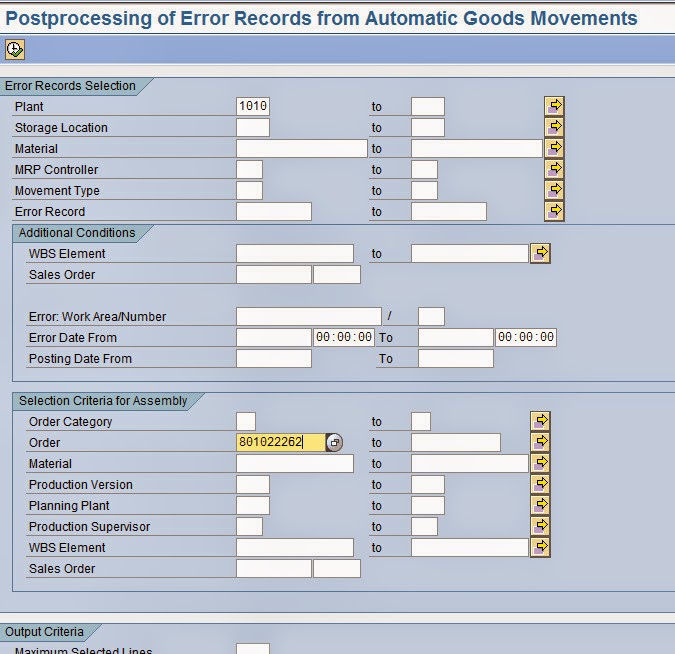


Select the line and Delete.


Then Save.

Now order will make Business Completed (CLSD)

Also you may have run the following transaction to identify errors: 

COGI - For post processing goods movements 
CO1P - Predefined Confirmation Process
IW46 -  For post processing confirmations from CATS
COFC - For post processing actual costs
COGI - For post processing goods movements

If Settlement Required then do it by KO88 for required period.

Sunday, March 16, 2014

SAP PM Order Configuration Part 2

IMG:
Functions and Settings for Order Types 

> Define Default Value for Planning Indicator for Each Order Type
These Indicators could be used for Reporting Purposes  like IW38, PMIS etc. you could view how many planned orders, unplanned orders and Immediate Orders were there.
 
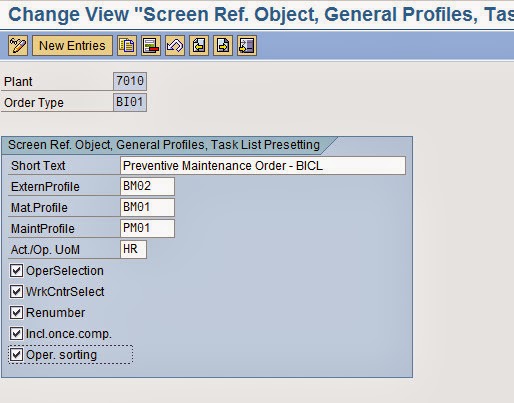
> Default Values for Task List Data and Profile Assignments

> Settlement Rule: Define Time and Creation of Distribution Rule

> Define Default Order Types for Maintenance Items

> Define Notification and Order Integration

Control Keys > Maintain Control Keys


> Maintain Default Values for Control Keys for Order Types


Maintenance Activity Type:
IMG > Plant Maintenance and Customer Service > Maintenance and Service Processing > Maintenance and Service Orders > Functions and Settings for Order Types> Maintenance Activity Type
> Define Maintenance Activity Types 


> Assign Valid Maintenance Activity Types to Maintenance Order Types

>Costing Data for Maintenance and Service Orders > Assign Costing Parameters & Results Analysis Keys


> Define Change Docs, Collective Purc. Req. Indicator, Operation No. Interval 

Define Documentation for The Goods Movements For Order
IMG > Plant Maintenance and Customer Service > Maintenance and Service Processing > Maintenance and Service Orders > Functions and Settings for Order Types> Goods Movements for Order >
Define Documentation for Goods Movements for the Order 


> Availability Check for Material, PRTs, and Capacities
Define Checking Rules

 > Define Inspection Control 

Define Account Assignment Categories For Document Types For Purchase Requisition

IMG > Plant Maintenance and Customer Service > Maintenance and Service Processing > Maintenance and Service Orders > General Data
 > Define Account Assignment Cat. and Document Type for Purchase Requisitions


Assign order types to maintenance plants.

Plant Maintenance & CS --> Maintenance and Service Processing --> Maintenance and Service Orders --> Assign order types to maintenance plants.

Define the parameters for completion confirmations.  

Plant Maintenance & CS --> Maintenance and Service Processing --> Maintenance and Service Orders --> Completion confirmations --> Define the parameters for completion confirmations.

End Of Part Two

All Links are available here

Wednesday, February 5, 2014

SAP PM Order Configuration Part 1

SAP Plant Maintenance Order Configuration.

Configure Order Types: (T Code : OIOA)

IMG Menu :
Plant Maintenance and Customer Service > Maintenance and Service Processing > Maintenance and Service Orders > Functions and Settings for Order Types >

Configure Order Types.

It is recommended to create new order types from standard types. We can create like this..

Select the Standard Order types and click on Copy as Button or Press (F6).

SAP PM Order Type Configuration
 
New Form will appear. here Set your desired order types and change the description. You have to set for settlement profile 40 for general maintenance order.

SAP Plant Maintenance Order Types Configuration

Another One Order Type: Refurbishment Order:


 Press Enter and Save.
> Indicate Order Types for Refurbishment Processing


> Define Number Ranges for Order Types: (T Code : OION)


SAP PM Order Number Range

For number range assignment you can check below link

 http://shirazul-sap.blogspot.com/2013/05/pm-equipment-configuration-part-2.html


 Assign Order Types to Maintenance Plants : ( T Code : OIOD )

You can Assign manually or can copy and reset.


Assign Inspection Types to Maintenance/Service Order Types

Object Information > Assign Object Information Keys to Order Types


> Define Field Selection for Order Header Data (PM)
Field Selection for location / Account Assignment Data 


Field Selection for order Header Data and Reference Object


 Partner > Define Partner Determination Procedure and Partner Function


> Availability Check for Material, PRTs, and Capacities
 Define Scope of Check


Create Default Value Profiles for General Order Data


Create Default Value Profiles for External Procurement


Default Values for Task List Data and Profile Assignments


* Create Authorization Keys for User Status Authorizations (T Code: BS52)


* Assign Cost Elements to Value Categories ( Integration point) (T Code : OIK2)


Sunday, January 26, 2014

SAP Plant Maintenance Order

SAP Plant Maintenance Order:

PM Orders are the most important part and key of planning and executing Maintenance activities. Maintenance order is a very powerful tool to record maintenance job details, Material involvement  and wages,  cost in the finance and controlling documents.

This functionality is not available in Notification.

Why we create PM order ?
1. Plan and Execute maintenance work in a well co-ordinate manner .
2. Maintenance Job schedule, priority, labor resources and capabilities

PM Order Types:  
Following are the Standard PM Order types available in SAP, however additional order types can also be created on your need basis


PM01 Maintenance order
PM02 Regular Maintenance order
PM03 Preventive Maintenance Order
PM04 Refurbishment order
PM05 Order including Notification
PM06 Calibration Order

PM07 Investment Order
SM01 Service Order

How to Create a Maintenance Order :

1. Order Create directly.
2. Order Create directly from Notification.
3. Order Create Automatically from Maintenance Planning.

You may check below link for process flow

http://shirazul-sap.blogspot.com/2013/06/sap-plant-maintenance-process-flow.html


PM Order Components: 
 Header Data, Operations ( Maintenance Task List), Components (Material, Services etc), Cost (Material, Service, Labor Costs etc.) Partner, Objects, Additional Data (Responsible Cost Center, Object Class, Profit Center etc.) Location Data, Planning Data etc.


PM Order Components


Plant Maintenance Order Costs


Order Related Important T Code: 

IW31 = Create

IW32 = Change

IW33 = Display

IW34 = Create Notification Order

IW37N = Change Order with Operation List.

IW38 = Change Order (List)

IW40 = Order List (Multi-level)

IW41 = Order Confirmation (CNF)

IW45 = Cancel Order Confirmation


Saturday, December 28, 2013

SAP PM Notification Create

SAP Notification Process. (Simplest Way)

1.Create Notification :
Menu Path : Logistics > Plant Maintenance > Maintenance Processing > Notifications Create (General) (T Code : IW21)
Purpose : 

Perform this procedure when a functional location or piece of equipment is damaged or any malfunction.
Prerequisites :
The following master data must exist:
• Functional location
• Equipment

Procedure
Start the transaction using the menu path or transaction.


Overview Tab


SAVE :


The System displays the massage.


2. Notification Processing - Put in Process

Open the notification by list editing t code (IW28) or IW22


Enter the comments on Long text screen and click to Put in process
and  Click Save


3. Notification - Completion

 Open the notification by list editing (IW28) or IW22.


Click


Press Enter.
System will showing massage notification is completed.


4. Notification Display


T Code : IW23


  ther Notification Related T Code :

IW27 : Set Deletion Flag for Notification

IW28 : Change Notifications (List)

IW29 : Display Notifications

IW30 : Notification List (Multi - Level)