Business Process Overview :
Preventive maintenance is the pre-planned maintenance activity that performed while the equipment is still working, so that it does not
break down unexpectedly. Preventative maintenance is planned so that any required resources are available.
Preventive Maintenance is also used to avoid system failure other objects, which - in addition to the repair costs - often result in much higher costs subsequently owing to production breakdown.
Preventive Maintenance is also used to avoid system failure other objects, which - in addition to the repair costs - often result in much higher costs subsequently owing to production breakdown.
There are many benefits
in using preventive maintenance within your company. It is the generic term for systematic
inspections, detection, Correction for which the time and
scope of the work can be planned in advance.
You can use
maintenance plans to describe dates and the extent of preventive and inspection
maintenance tasks which can be planned for technical objects. You can ensure
that your technical objects are always maintained on time and in this way,
ensure that they function optimally.
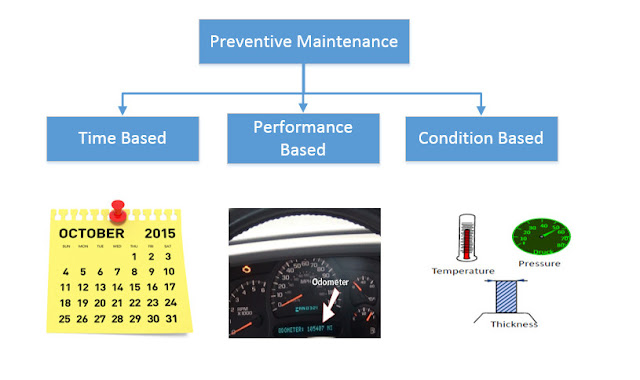
Preventive Maintenance :Types
 Time Based Preventive Maintenance :
In time-based preventive maintenance, the maintenance tasks are planned and performed depending on the time-dependent intervals determined. Example : There are vehicles(equipment) which needs to be serviced after different-2 cycles like1 month, 4 months, 6 months, 12 months..etc
Performance Based Preventive Maintenance :
In Performance Based preventive maintenance performed based on Counter Reading. Example : There are vehicle which needs to be serviced after running 5000 kms, 10000 kms and so on.
Condition Based Preventive Maintenance :
In the case of condition-based maintenance, maintenance activities are always performed when the measuring point of a technical object has reached a particular state or outside a specific value range. For example, a thread depth below 15 mm or temperature higher than 85 C.
Strategy and Task List
Maintenance Strategy consist of several maintenance packages. It is the scheduling rule for preventive maintenance.
Preventive Maintenance :Types

In time-based preventive maintenance, the maintenance tasks are planned and performed depending on the time-dependent intervals determined. Example : There are vehicles(equipment) which needs to be serviced after different-2 cycles like1 month, 4 months, 6 months, 12 months..etc
Performance Based Preventive Maintenance :
In Performance Based preventive maintenance performed based on Counter Reading. Example : There are vehicle which needs to be serviced after running 5000 kms, 10000 kms and so on.
Condition Based Preventive Maintenance :
In the case of condition-based maintenance, maintenance activities are always performed when the measuring point of a technical object has reached a particular state or outside a specific value range. For example, a thread depth below 15 mm or temperature higher than 85 C.
Strategy and Task List
Maintenance Strategy consist of several maintenance packages. It is the scheduling rule for preventive maintenance.
Maintenance task lists describe a sequence
of individual maintenance activities which must be repeatedly performed
within a company. Task lists eventually become the
operations within the maintenance order that is generated through the Maintenance
Plan.
There are three types of task lists that can be distinguished from one another using indicators:
Configuration Steps :

Plant Maintenance and
Customer Service > Maintenance Plans, Work Centers, Task Lists and PRTs >
Basic Settings > Define Maintenance Planner Groups

Plant Maintenance and
Customer Service > Maintenance Plans, Work Centers, Task Lists and PRTs >
Basic Settings > Define ABC Indicators

Plant Maintenance and
Customer Service > Maintenance Plans, Work Centers, Task Lists and PRTs >
Maintenance Plans > Set Maintenance Plan Categories

Plant Maintenance and
Customer Service > Maintenance Plans, Work Centers, Task Lists and PRTs >
Maintenance Plans > Define Number Ranges for Maintenance Plans


Plant Maintenance and Customer Service > Maintenance Plans, Work Centers, Task Lists and PRTs > Maintenance Plans > Define Number Ranges for Maintenance Items

Plant Maintenance and
Customer Service > Maintenance Plans, Work Centers, Task Lists and PRTs >
Maintenance Plans > Define Sort Fields for Maintenance Plan


Plant Maintenance and
Customer Service > Maintenance Plans, Work Centers, Task Lists and PRTs >
Task Lists > General Data > Maintain Task List Status

Plant Maintenance and
Customer Service > Maintenance Plans, Work Centers, Task Lists and PRTs >
Task Lists > Control
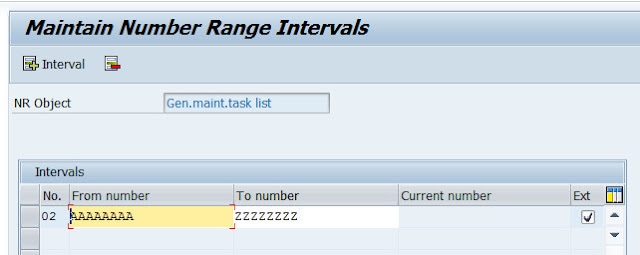
Data > Define Number Ranges for General
Maintenance Task Lists
Plant Maintenance and
Customer Service > Maintenance Plans, Work Centers, Task Lists and PRTs >
Task Lists > Define Number Ranges for Equipment Task Lists

Plant Maintenance and
Customer Service > Maintenance Plans, Work Centers, Task Lists and PRTs >
Task Lists > Define Number Ranges for Task Lists for Functional Locations

Plant Maintenance and
Customer Service > Maintenance Plans, Work Centers, Task Lists and PRTs >
Task Lists > Control Data > Define Profiles with Default Values
 End
End