Showing posts with label SAP PM. Show all posts

Wednesday, June 5, 2013

Work Center and Cost Center in SAP Plant Maintenance.

 Work Center:
A work center is a particular place or geographic location where Maintenance Operation carried out. Work center could represent a particular workstation with specific tools and equipment on a specific floor of  a specific building. Example..

MECH : Mechanical Work Center.
ELEC : Electrical Work Center

T Code : IR01, IR02, IR03 IR05.

The work center has an available capacity. The activities performed by the work center are valuated by charge rates, which are determined by cost centers and activity types. Work centers can be:
Machines
People (Labor, Expert etc)
Production lines
Groups of craftsmen

Use
Work centers are used in task list operations and work orders. Data in work centers is used for ......
  • Scheduling
Operating times and formulas are entered in the work center, so that the duration of an operation can be calculated.
  •     Costing
Formulas are entered in the work center, so that the costs of an operation can be calculated. A work center is also assigned to a cost center.
  •     Capacity planning
The available capacity and formulas for calculating capacity requirements are entered in the work center.
  •     Simplifying operation maintenance
Various default values for operations can be entered in the work center.


Cost Centers : Cost Centers are Cost Collector in SAP. Its tracked costs are individually.

Example: Department Mechanical have one Cost Center named BICLMECH.
T Code : KS01.

Monday, May 27, 2013

SAP PM General Data Configuration Part 2

IMG Path : Plant Maintenance and Customer Service > Master Data in Plant Maintenance and Customer Service > Technical Objects > General Data

> Set View Profiles for Technical Objects
This Customizing activity allows you to create individual screens for technical objects.

The data fields for the technical objects are sorted by contents into screen groups. It is possible to define one or more view profiles for each screen group, for example, Equipment. Each view profile enables you to assign pre-grouped and accompanying fields to individual screen templates. These screen templates can be labeled individually using tab pages.

To make the tab pages visible in the maintenance transactions, they must be labeled as active. You can assign a view profile to each equipment category or functional location category, and to each fleet object type.
Screen Group Equipment Data T Code (S_ALR_87009237)
 ( I have just shown what is this configuration, You can create it by New Entries)


Select Screen group equipment data and double click on Activity and Layout of views. 


Here You can See under Description "General, Location, Organization, Structure and Additional data 1. 

Number 10. General will show the General Tab for Equipment Master data , that contains Screen no 005, 010 and 015 show at below....

Number 20, Location Tab Contains Screen No 20 and 25, Number 30 Organization Tab contains  screen 30 and 35, Number 50 Structure Tab contains screen 40 and 45 and lastly  Number 60 Additional Data 1 contains 110 and 97 screens.

Click Icons and texts of views

Here Additional Data 1 renamed to Warranty and Specification Tabs.

In this Configuration you can see the effects below....

Location Tab :


Screen Group Functional Location Data.


 Screen Group Fleet Object Data


> Define Object Information Keys (T Code : OIMD)


Sunday, May 26, 2013

SAP PM General Data Configuration Part 1

IMG Path:

Plant Maintenance and Customer Service > Master Data in Plant Maintenance and Customer Service > Technical Objects > General Data

> Define Types of Technical Objects.

Create a Object Type and its description and Save.
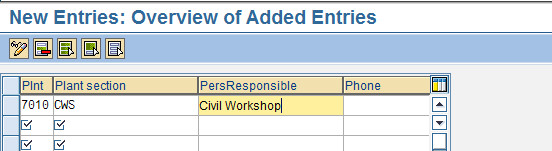
> Define Plant Sections (T Code : OIAB)


Plant Section is a division of maintenance plants in to Production areas. Machines or sets of machines that are represented in the system as pieces of equipment or functional locations are installed in Plant Sections.

> Define Planner Groups (T Code : OIAI)

Planner group is a group of employees responsible for planning and processing maintenance tasks in a plant.


> Define ABC Indicators (T Code : OIAA)
 ABC Indicators are used to define the importance of the technical objects
> Define Authorization Groups (T Code : OIAG)

Authorization groups are used to categorize similar objects from the point of view of authorization. Example : Mechanical, Electrical, Automobile, Civil etc.


Define Locations ( T Code : OIAS)


Then Save..You can skip this Part..


End Of Part 1

Next Topic 
SAP PM General Data Configuration Part 2